You Ask the Question - We Find the Answer

  • Relationships
  • Hosting
  • Scams
  • Tech
  • Quotes
  • Marketing
  • Top
  • Work from home
  • Health
  • Pets
You are here: Home / Archives for 2016

Archives for 2016

A Comprehensive List of Malware Types and What they Do

What are the Various Types of Malware and What do they Do?

malware types
Malware is a term used to refer to a wide range of hostile or intrusive software which can take the form of scripts, executable code, active content, or rogue security software. They vary in their purpose, how they infect a computer, how they replicate and the damage or security risk they pose. Here is a list of commmon Malware types:

Virus

Viruses are very varied and there are over 1 million viruses in existence. All attach themselves to an existing program and either replicate themselves when that program is run or modify a program in some way. The main purpose of a computer virus is to corrupt the system or destroy data. They can infect data files, or even the boot sector of the hard drive

Spyware

These are programs that can covertly record what you do on your computer. Some spyware is legitimate and is used to help a user. For example gaining access and viewing another person’s computer screen. Even controlling the curser. However the majority of Spyware is malicious and usually used to capture logins and passwords or even bank or credit card details.

Worms

A computer worm is an independent, self-contained computer program that can replicate itself in order to spread to other files on a computer or other computers within a network. Unlike a virus, a worm does not need to attach itself to an existing program.

Adware

While the least dangerous malware it’s one of the most common. It is also one of the most lucrative in that it downloads and displays unwanted ads that redirect the user to advertiser websites. Benign Adware requests the Users permission before displaying ads while malicious adware does not notify the user or obtain his or her consent.

There are two ways that Adware can infect your computer. This can be via Freeware or shareware and can involve a legitimate way of generating advertising revenue from a program you have downloaded. A second way is from an infected website which can result in unauthorized installation of adware on your machine whereby a hacker can gain access to a browser vulnerability, even placing a Trojan on your computer. These are usually cased Browser Hijackers.

Trojan

A computer Trojan is one of the most dangerous forms of malware due to its ability to deceive users of its true intent, often disguising itself as legitimate software. After a Trojan has infected a computer, they can then be activated and in some cases be used by cyber-criminals to gain backdoor access to a computer and steal sensitive data.

A denial of service attack can also occur when sending multiple requests from your computer and several other infected computers, overwhelming the target address.

Rootkit

These are one of the hardest to detect and remove as they are designed to conceal certain activities or programs on your computer with the main purpose of preventing malicious programs from being detected – thereby extending the time by which a program can run on an infected computer. A rootkit can enable an unauthorized user to gain control of a computer without being detected and can be hard to remove even when using anti-virus software.

Keyloggers

Keyloggers are used to record every keystroke made on a computer, often with the intent of gaining access to logins and passwords or other confidential information. However they are sometimes legitimately used by companies to record an employee’s activity or by parental software.

Ransomware

Ransomware is a type of malicious software designed to lock the system or block access while online. It will often display a message until a sum of money is paid, sometimes appearing as a notification from the police or FBI, or demand money for the removal of a non-existent virus. More advanced Ransomware may encrypt a victims files and make them inaccessible until the user provides a ransom payment to decrypt them.

Browser Hijacker

A Browser Hijacker is malware that changes your browser’s settings, often redirecting you to a different website. Usually this involves changing your homepage or search engine without permission. The purpose is usually to force traffic to a particular website, thereby generating revenue. Some Browser Hijackers can install a software keylogger to gather unauthorised information or they can damage the Windows registry.

Rogue security software

This is software designed to appear like legitimate security software and misleads users into believing their computer is infected with a virus, with the intent of tricking them into paying money for a fake malware removal tool. The fake malware removal tool can even introduce real malware onto the computer

Filed Under: Tech Tagged With: Computer security, malware, security software

Dating Sites Similar to Plenty of Fish

What are some Dating Sites Similar to Plenty of Fish?

If you’re sick of POF, here are some Free alternatives similar to Plenty of Fish. They all have their pros and cons and you will have a higher chance of meeting someone on some more so than others, the most important factor being the ratio of males to females.

Couplelizer

Couplelizer
An easy to use site designed to encourage users to go on actual dates rather than spend hours chatting online. It also prevents fake photos and photo edits by only permitting selfies.

Users indicate their private information, name, surname and date of birth, gender and the place of living. Just a brief description of yourself and a selfie is enough. You will get to know the person in real-life
Click here to visit Couplelizer

FREE

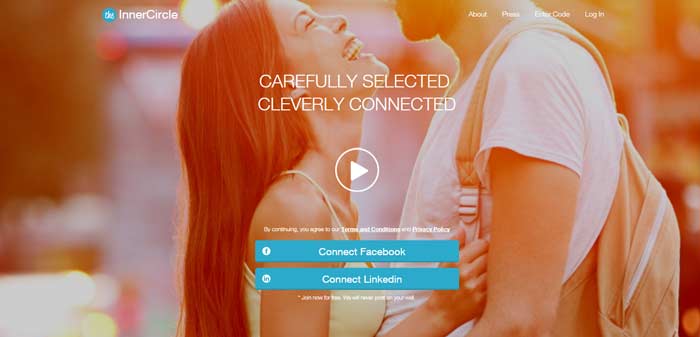
Inner Circle

Inner Circle
This dating app is not for everyone and not everyone can become a member. As the name suggests it’s more for high-end, exclusive members.

You don’t just join – you must be invited based on a strict screening process upon registration to ensure eligible singles with similar lifestyles. Members provide plenty of details about themselves and are selected based on their profession, education, age, interests and more according to the CEO.

If you’re a man, the greatest advantage of Inner Circle is that unlike POF and other dating sites there isn’t a disproportionate ratio of women to men. In fact, It’s so popular among women that the site owners had to have a one month ban on allowing new female members signing up. Also the Inner Circle hosts plenty of “exclusive parties” — held at some of London’s “most glamorous” venues. The Inner Circle currently hosts offline events on a regular basis for users located in Amsterdam, London, Paris, Milan, Barcelona and Stockholm.
Click here to visit theinnercircle

FREE

Tinder

Tinder Review
This dating app is not recommended unless you’ve got a thick skin or very good looking. The disproportionate number of men to women mean you’ll have a hard time finding a date, even if you meet their criteria. Also some of the profiles will be spammers such as call girls. It caters more to guys than gals whereby and superficiality matters more than substance.

You signup through facebook and add a photo of yourself with just a few characters for the description. You swipe left to pass or swipe right to like when viewing other users profiles. If the other user swipes the same way then you’re a match. It’s somewhat similar to the Plenty of Fishe like function. Don’t expect to get a positive response soon as women are inundated by men trying to contact them.

One advantage of the app is the number of users. You should find people just about anywhere with the app and the live chat feature means you can talk straight away.

The paid version for $9.99 / month includes unlimited swiping, GPS spoof,a super like function and the ability to undo an accidental swipe.
Click here to visit Tinder

Free to Join but limited Swiping for non paying members

Bumble

Bumble
Similar to Tinder in that Bubble’s main platform is a hot or not-style swiping game, in which you swipe left to pass or right to like. Also like Tinder the app requires facebook to signup but unlike Tinder communication is in the hands of females and is only available for 24 hours after a mutual match is made. This encourages females to be more active and initiate conversation. It also means men waist less time typing out a message to someone who is unlikely to respond.

It’s free to join and if you want extra functionality you can pay $9.99 a month. This will enable you to see people who have already liked you so you don’t have to swipe and wait for matches. It will also enable you to reconnect with expired matches, extend beyond 24 hours and provide an undo accidental swipe feature like tinder.
Click here to visit Bumble
Free to Join but limited Swiping for non paying members

OKCupid

okcupid review
OkCupid is more detail orientated than Tinder in that users tend to fill out a lot more information about themselves, so you can avoid those who aren’t looking for a serious relationship. However just like Tinder, men significantly outnumber women. Unlike Tinder and Bumble anyone can contact you without matching first. This can lead to women receiving too much unwanted attention.

It used to be a very popular site but has decline in popularity due to the rise of Tinder and Bumble which offers a more geo-specific experience.

I noticed from a number of reviews that customer service isn’t always that great – even if you’re a paying member – with some members claiming it was difficult to contact customer service and how they’ve been scammed by some users. Also some users claimed they got blocked for no apparent reason after using the site for a number of months.
Click here to visit OKCupid

FREE

Happn

Happn review
Happns is quite a sophisticated app created by computer engineers who came up with the idea of finding people you’ve crossed paths with (within a 250meter radius). The app is designed to save you from missed connections, “boosting luck again”.

If you’re shy about approaching that person who gave you the look, maybe you can contact them via happn. Happn’s popularity has skyrocketed with 100,000 people signing up for the app within the first five weeks.

Just like Tinder it anonymously creates your dating profile using facebook. It will then use GPS tracking to present you with a list of people near you. How many times you’ve crossed paths with them and a map of roughly where you crossed paths, their photos, name, age and profession and what you may have in common.

If you like what you see, you can hit the red love heart and if it’s mutual you can start messaging straight away. Even without a mutual like you can send a charm, which they’ll see.

The majority of those using this app are under 40 and conversations can be hard to come by.
Click here to visit Happn

FREE

If you know of any dating sites similar to Plenty of Fish which you’ve tried yourself and liked, please mention them in a comment below.
[author-details=Simon Hough]

Filed Under: Relationships Tagged With: dating, internet dating, online dating, plenty of fish, POF

Top 12 Weird, Fascinating and Creepy Websites

What are some of the Weirdest, Creepiest and Fascinating Websites Online?

Here’s some websites that can be described as Weird, Fascinating or Creepy. Let me know if you have any suggestions yourself:

Creepygirl

Creepy Girl features a creepy looking girl with bloodshot eyes who will follow your every cursor move. The graphics are well done and appear to be put together using CGI special effects.
Creepy Weird Girl

planecrashinfo.com

Planecrashinfo.com provides a collection of voice recordings and transcripts from the most devastating and renowned plane crashes since the 1960s. The site is well visited and updated regularly. This website isn’t just creepy but sad and disturbing.
Weird Plane Crash Website

ZoomQuilt.org

The amount of work that must have gone into creating this artwork or collection of artworks is incredible! The site will take you on a weird journey into the center of the artwork, which will then continue to morph into yet more artwork, zooming in until infinity.
Weird infinite zoom website

FacesofFacebook.com

This site shrinks every Facebook Profile pic into a space the size of your screen and allows you to zoom into each one depending on where you click. You’ll have a hard time finding yourself with over 1.2 Billion faces and updating. You can even connect to Facebook and find out exactly where you and your friends are located.
facebook faces

nohomophobes.com

This site takes the fight against homophobia to a new level replete with graphs, statistics and live tweets from people using any homophobic or mildly homophobic language. One has to admire the work that has gone into creating this site. Witness live updates on Twitter of anyone using language this guy disapproves of. The theme of this site is to record on a daily basis every single homophobic thing that is said on Twitter!
No Homophobes website

9-eyes.com

Provides some of the more weird and disturbing Google Street images – from gangs, to people in the process of committing a crime or just behaving strange. The site captures the good, the bad and the ugly.
9 Eyes Website

flightradar24.com

Flightradar24 is a Swedish internet-based service that shows real-time aircraft flight information on a map. It includes flight tracks, origins and destinations, flight numbers, aircraft types, positions, altitudes, headings and speeds, all in real time!
Flight Tradar Website

anasomnia.com

Perhaps I’m just paranoid but as soon as I visited this site I was notified/warned by Windows 7 that the site would like to use my Web cam, camera and microphone. I didn’t hang around for long. Best to turn your web cam and microphone off just in case, when visiting this one.
anasomnia Website

Lingscars.com

Lingscars.com provides uk contract cars for hire in the UK. It has one of the most cluttered and flashy sites on the internet I’ve ever seen – everything from a singing girl, to a video game to flashing graphics just about everywhere and these aren’t ads. The quirkiness and weirdness of the site is one of the reasons for it’s success.
Lings Cars Website

Dearphotograph.com

If you’re a nostalgic person you may like dearphotograph.com. If you like the idea of re-living the moments you once had, special events or people you once knew this site caters to that.
dear_photograph

how-old.net

This site uses Artificial Intelligence to determine how old you look. Just upload your own photo and it will calculate your age based on facial characteristics. Assuming you upload a high quality photo of your face, it is surprisingly accurate.
How Old Website

shayesaintjohn.net

This is probably the creepiest and weirdest website. According to internet legend the fictional character of Shaye Saint John was a disfigured supermodel rebuilt with mannequin parts and subject to CIA mind-control experiments. With poor editing, sinister music and terrifying masks, Shaye has creeped people out for years.
Shaye Saint John

[author-details=Simon Hough]

Filed Under: Top Tagged With: crazy, weird

How to Download Videos from the Internet for Free

How can I Download Any Video from the Internet for Free?

download a video online
If you’re trying to download videos from the Internet there are both Free and Paid Methods of doing so. The problem is that there are so many video file formats, so knowing exactly which tool to use and how to use it can be difficult.

Here is a list of the top tools for doing so, both Free and Paid and the Software I use. Please make sure you are not violating copyright before downloading the video.

Downloading Youtube Videos

YouTube by Click[star rating=”4.5″]

YouTube by Click is very simple and easy to use and fast, best of all it’s free.

YouTube by Click DownloaderYouTube by click supports all major video sites. With YouTube By Click you can download videos from Vimeo, Facebook, Instagram, Dailymotion, and other sites. You can even Download Private YouTube and Facebook videos.

You can also download and convert any video to FLV, WMV, MP3, MP4, AVI, WEBM, 3GP, WAV. You can download from all video sites, all formats and in different qualities such as 720p, 1080p an 4k.

Download the software from the link below and start downloading a video straight away. When you visit a video you should get a popup asking you whether you want to download the video or an audio version (MP3). You can also paste the URL into the tool and it will start downloading.
Download Youtube By Click

Downloading Flash Videos on Chrome

Flash Video Downloader [star rating=”4″]

Flash Video DownloaderFor downloading Flash Videos on Chrome I would recommend Flash Video Downloader. It Downloads most popular media formats, including flash videos. It works on most websites, it’s simple to use and free!

If you want to download Youtube videos using a Chrome extension you’re out of luck. Unfortunately Google who owns Youtube don’t like users downloading Youtube videos using one of their chrome extensions.

The extension has positive reviews. However according to one reviewer it makes my google chrome lag when I am browsing Facebook and makes my videos on Facebook hard to load (depends on internet speed). However if you experience this problem you can easily rectify it by simply disabling the plugin. Also it can occasionally bug you for asking a review to continue using it.
Download Flash Video Downloader

Sothink Flash Downloader [star rating=”4″]

For Firefox I would recommend Sothink Flash Downloader. You can easily save rich SWF format media from Firefox with great speed. One-click Flash download without copying and pasting the URL. Just put the mouse cursor above the flash (an icon will appear on the top left corner), click it and choose which folder to save.
Download Sothink Flash Downloader

Downloading HTML5 Videos

Downloading HTML5 Videos can be trickier, and you may need to purchase software for this. However you should first try to download the video by selecting file > Save as from the chrome or Firefox menu.

Video Download Capture[star rating=”5″]

If that doesn’t work I recommend Video Download Capture. It’s a program I use myself to download any video from any website, whether they be FLV, WMV, MP3, MP4, AVI, WEBM, 3GP, or WAV.  Due to it’s auto-detection facility it will even download videos that are impossible to download using free software. You can even download online videos that are streamed by HTTP, FTP, RTMP and other multimedia transferring protocols which are usually next to impossible to download.

Video Download Capture

You are also allowed to download multiple videos in parallel which helps you save time and it will enable you to convert one video format to another. It isn’t free but well worth it if you download a lot of videos.
Download Video Download Capture

[author-details=Simon Hough]

Filed Under: Tech Tagged With: Download video, Download videos, Video download, Video downloads, Video sites

  • « Previous Page
  • 1
  • 2

Recent Comments

    Copyright © by AskBoard.com • All rights reserved